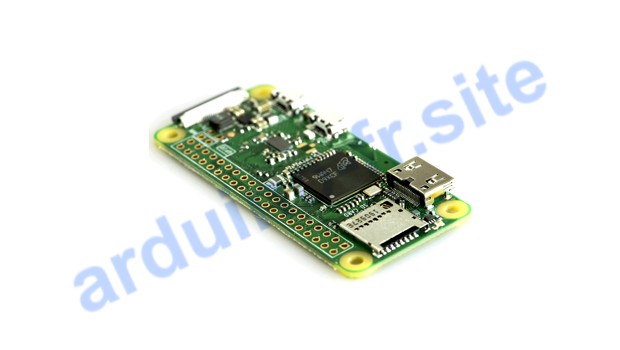
Raspberry Pi Zero is a compact version of a single-board computer. It is equipped with a Broadcom BCM2835 chip, 512 MB of RAM, I/O ports, microSD card slot and multimedia interfaces. There is also a microSD card slot, mini-HDMI and a USB port. Let’s take a look at the pinout of the Raspberry Pi Zero board and what you can do with it.
Pour cette activité, nous aurons besoin:
- Raspberry Pi Zero
GPIO pinout of the Raspberry Pi Zero
The Raspberry Pi Zero features a single-core Broadcom BCM2835 processor running at 1GHz, 512MB of RAM and connectors for Wi-Fi 802.11 b/g/n, Bluetooth 4.1 and microUSB. The Raspberry Zero has a 40-pin GPIO (General Purpose Input/ Output), composite video output (TV), two micro-USB connectors (one for power, one for USB peripherals) and a mini-HDMI connector.
The Raspberry Pi Zero is the smallest single-board Raspberry Pi minicomputer. The Raspberry Pi Zero mainly runs Linux kernel-based operating systems such as Raspbian, Ubuntu MATE, Ubuntu Core, OSMC, OpenELEC, LibreELEC, Android, Arch Linux ARM, openSUSE, Gentoo Linux, CentOS, Fedora, Kali Linux, and others. In May 2016, version 1.3 of the Raspberry Pi Zero with a CSI port for camera connection was introduced.
Raspberry Zero technical specifications
Raspberry Pi Zero Datasheet
- Single-chip system: Broadcom BCM2835 SoC
- CPU: ARM1176JZ-F with 1.5 GHz clock frequency
- GPU: VideoCore IV with 400 MHz clock frequency
- RAM: 512 MB
- Digital audio/video output: mini-HDMI
- Composite video output: 2 solder pins
- Peripheral ports: Micro USB with OTG
- Camera port: Serial camera interface (MIPI CSI)
- Memory card support: microSD
- GPIO I/O ports: 40
- Power supply voltage: 5V
- Dimensions: 66 × 32 × 5 mm
Raspberry Pi Zero operating system
A Micro USB power port is provided for electrical connection. The recommended voltage is 5 V, with an output current of 2 A. For operation, you’ll need a microSD card, on which you can write an image of the Linux-based Raspbian distribution. When you switch on Raspbian, the system is loaded in a few seconds with the graphical Raspbian command interpreter, similar to Windows.
What to do on Raspberry Pi Zero
Home automation. The Raspberry Pi Zero can be used as a central controller to control various devices in the home, such as lighting, heating and air conditioning, security and other home automation devices.
Multimedia center. The Raspberry Pi Zero can be used to create a multimedia center that lets you stream videos, music, TV online in France, photos and other multimedia files to your TV set.
Internet of Things. The Raspberry Pi Zero is an ideal platform for creating Internet-related projects.
Retro games console. The Raspberry Pi Zero can be used to create your own retro game console.
Portable computer. The Raspberry Pi Zero can be used to create a portable computer that can be used to browse the web, send e-mails, work with office applications and other tasks.











Laisser un commentaire